Home › Templates › Google Sheets to PDF Mail Merge
Google Sheets to PDF Mail Merge
Make a separate PDF for every row of a Google Sheet, laid out with your own Google Docs template, with a link to each PDF written back into the sheet.
Use this templateFree · no sign-up to preview · 50 files a month · no watermark
How it works
- Start with your rows. Try the sample rows, upload a CSV or Excel file, or sign in and choose a Google Sheet you already have.
- Match the template. The template's {{Tags}} are matched to column names automatically. Preview any row to see its PDF before you create anything.
- Get one PDF per row. Sign in and create. Each row becomes its own PDF in a Drive folder, and the PDF link appears next to the row.
Why not just File, Download, PDF?
Google Sheets can download a whole sheet as one PDF, but that prints the grid, not a document. A mail merge gives every row its own nicely laid out page: a confirmation, a statement, a report card or a receipt, each as a separate file you can send to one person.
The layout lives in a Google Doc, so you can use headings, tables, images and your company's branding. The sheet stays a clean list of data.
Links back in the sheet
When a PDF is created, MergeDoc writes three columns next to your data: a status, the link to the PDF and the time it was made. You can filter the sheet to find a person and open their PDF in one click, or copy the links into an email tool.
If something goes wrong on a row, for example a missing value, its status shows the reason in plain words. Fix the cell and run again; only rows that are not done yet are processed.
Only the rows you want
Add a condition to merge only some rows, for example where Status equals Paid. Rows that do not match are marked as skipped, so you can see at a glance which documents were not made and why.
Naming and organising the PDFs
By default the PDFs go into a MergeDoc Output folder in your Drive, but you can choose any folder, including a shared drive folder your team already uses. File names can combine several columns and fixed text, such as {{Reference}} - {{Name}}. Characters that are not allowed in file names are replaced automatically, and an empty name falls back to the row number so no file is ever left without a name.
Sample data
These are the columns the general pdf document template uses. Each row becomes one document. Download the sample CSV to see the format, or replace it with your own list.
| Title | Name | Reference | Date | Details | Amount | Status |
|---|---|---|---|---|---|---|
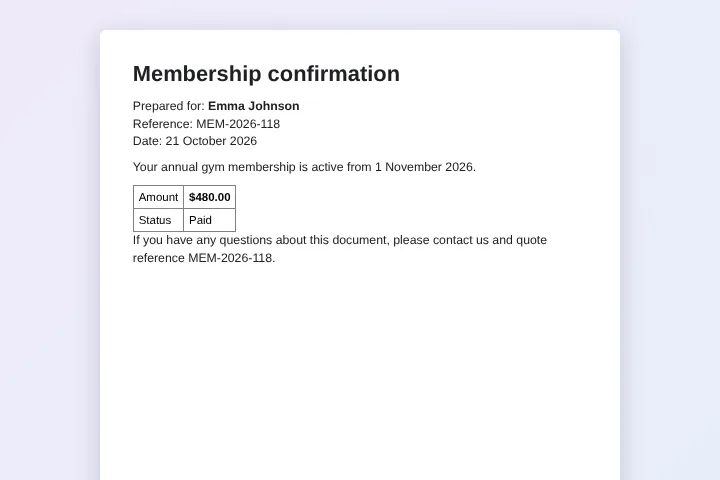
| Membership confirmation | Emma Johnson | MEM-2026-118 | 21 October 2026 | Your annual gym membership is active from 1 November 2026. | $480.00 | Paid |
| Membership confirmation | Liam Smith | MEM-2026-119 | 21 October 2026 | Your monthly gym membership is active from 1 November 2026. | $45.00 | Paid |
| Membership confirmation | Olivia Brown | MEM-2026-120 | 21 October 2026 | Your student membership is active from 1 November 2026. | $300.00 | Pending |
| Membership confirmation | Noah Davis | MEM-2026-121 | 21 October 2026 | Your family membership is active from 1 November 2026. | $900.00 | Paid |
Who uses this template
Gyms and studios
Send each member a PDF confirmation of their plan, reference number and amount.
Teachers
Produce a PDF report for each student from the marks sheet at the end of term.
Accountants
Make a statement PDF for every client from the summary sheet.
Operations teams
Generate delivery notes or work orders, one PDF per order row.
Frequently asked questions
Is the PDF mail merge free?
Yes. The free plan makes up to 50 PDFs a month, with no watermark. Pro has no MergeDoc limit for $5 a month or $39 a year.
Can I get Google Docs instead of PDFs?
Yes. Choose Google Doc, PDF or both before you create the files.
How many rows can one run handle?
Hundreds of rows work in one run. Keep the tab open while it runs; if Google slows things down, MergeDoc waits and continues by itself.
Does it work with Excel files?
Yes. Upload an .xlsx or .csv file and Google converts it to a Google Sheet in your Drive first.
What does MergeDoc store about my sheet?
Nothing from its content. MergeDoc keeps only your account email, your plan and counts such as how many files you created. Your rows and PDFs stay in your Google account.
Related templates
Generate PDFs from CSV in Bulk
Upload a CSV and get one PDF for every line.
Bulk Certificate Generator from Google Sheets
Course completion certificates with name, course, score and number.
Mail Merge Google Docs from Google Sheets
Personalised customer letters from a list of names and offers.
Ready to try it?
Preview the template with sample data, then sign in with Google to create your files.
Use this template