Home › Templates › Generate PDFs from CSV in Bulk
Generate PDFs from CSV in Bulk
Upload a CSV file exported from any system and turn each line into its own PDF document, laid out with a template you can edit in Google Docs.
Use this templateFree · no sign-up to preview · 50 files a month · no watermark
How it works
- Upload the CSV. Choose a .csv file from your computer. The first line must hold the column names; every following line becomes one PDF. Excel files work too.
- Preview a few lines. Before signing in, see how the PDF looks for any line in your file. Column names are matched to the template's {{Tags}}.
- Create the PDFs. Sign in with Google. Your CSV is saved as a Google Sheet in your Drive and one PDF is created per line, in the same folder.
From any export to finished documents
Almost every system can export CSV: online shops, CRMs, booking tools, school systems and accounting software. Turning that export into documents usually means opening a word processor and editing one copy at a time. Here you upload the CSV, check the preview, and get every PDF at once.
Your file is read in your browser for the preview. Nothing is uploaded until you sign in and choose to create the documents, and then it goes only to your own Google Drive.
How the CSV should look
Put the column names in the first line, for example Name, Reference, Amount. Use the same names inside double curly brackets in the template: {{Name}}, {{Reference}}, {{Amount}}. Matching ignores extra spaces and letter case, so amount and Amount work the same.
Values with commas must be in quotes, which is how most systems export them anyway. UTF-8 files keep accents and non-Latin letters correct. Download the sample CSV on this page to see a file that works.
Keep a record of what was made
Because the CSV becomes a Google Sheet, every line gets a status and a link to its PDF after the run. Next time, upload the new export as a fresh sheet, or add the new lines to the same sheet and run again so that only they are processed.
Choosing the right template
This page uses a general document layout with a title, the recipient, a reference, details and an amount. It suits confirmations, notices and simple statements. For certificates, invoices, payslips or badges, the related templates below start with a layout made for that job. Any template can be changed in Google Docs after it is copied to your Drive, and you can also pick a Google Doc you already have.
Sample data
These are the columns the general pdf document template uses. Each row becomes one document. Download the sample CSV to see the format, or replace it with your own list.
| Title | Name | Reference | Date | Details | Amount | Status |
|---|---|---|---|---|---|---|
| Membership confirmation | Emma Johnson | MEM-2026-118 | 21 October 2026 | Your annual gym membership is active from 1 November 2026. | $480.00 | Paid |
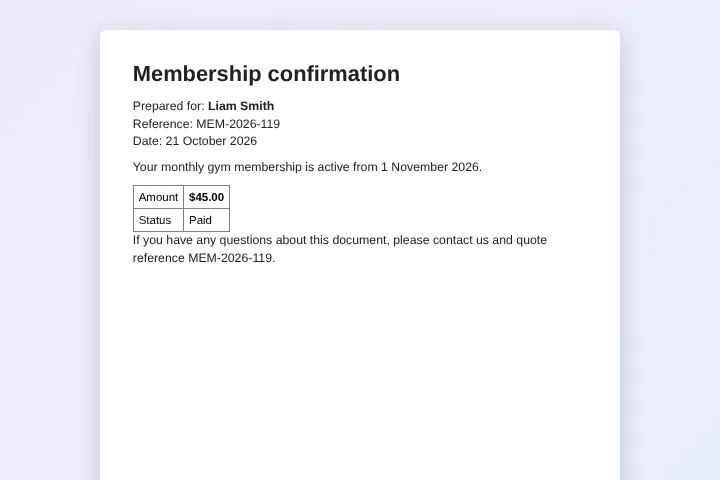
| Membership confirmation | Liam Smith | MEM-2026-119 | 21 October 2026 | Your monthly gym membership is active from 1 November 2026. | $45.00 | Paid |
| Membership confirmation | Olivia Brown | MEM-2026-120 | 21 October 2026 | Your student membership is active from 1 November 2026. | $300.00 | Pending |
| Membership confirmation | Noah Davis | MEM-2026-121 | 21 October 2026 | Your family membership is active from 1 November 2026. | $900.00 | Paid |
Who uses this template
Online shops
Turn an order export into packing slips or gift notes, one PDF per order.
Booking businesses
Create a booking confirmation PDF for every reservation in the export.
HR and payroll
Convert a CSV from your HR system into letters or statements for each employee.
Event registrations
Make tickets or confirmations from the registration list exported by your form tool.
Frequently asked questions
Is it free to generate PDFs from CSV?
Yes. Up to 50 PDFs a month are free, with no watermark. Pro has no MergeDoc limit for $5 a month or $39 a year.
Do I need a Google account?
You can preview without one. To create the PDFs you sign in with Google, because the files are saved in your Google Drive.
Is there a size limit for the CSV?
The preview handles files up to 5 MB. Large exports with thousands of lines are better split into a few files and run one after another.
Can I use semicolon-separated files?
Yes. Comma, semicolon and tab separated files are detected automatically from the first line.
Is my CSV uploaded to MergeDoc?
No. The preview runs in your browser and the created files go to your Google Drive. MergeDoc's servers never receive the file.
Related templates
Google Sheets to PDF Mail Merge
One PDF per row from any Google Docs template.
Bulk Invoice Generator from Spreadsheet
Numbered PDF invoices with client, item, quantity and total.
Payslip Generator from Excel or Google Sheets
Monthly payslips with basic pay, overtime, deductions and net pay.
Ready to try it?
Preview the template with sample data, then sign in with Google to create your files.
Use this template