Home › Templates › Mail Merge Google Docs from Google Sheets
Mail Merge Google Docs from Google Sheets
Write one Google Docs letter, keep your customer list in Google Sheets, and get a personalised letter for every row in a couple of minutes.
Use this templateFree · no sign-up to preview · 50 files a month · no watermark
How it works
- Add your list. Open the letter template and try it with the sample customers, or upload your own CSV or Excel file. You can also pick an existing Google Sheet after signing in.
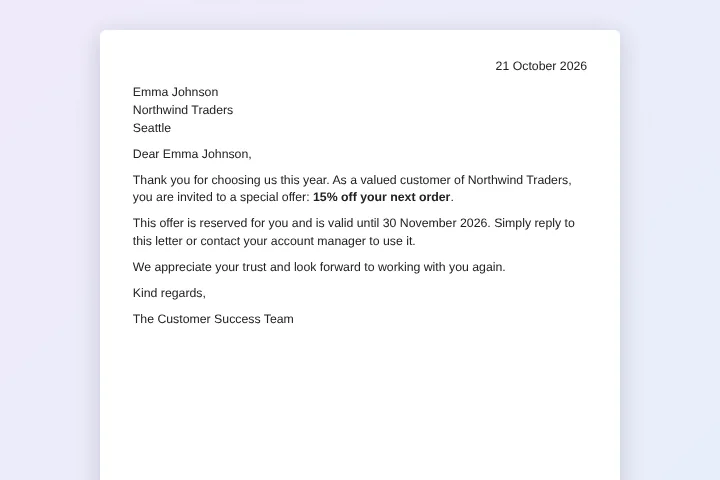
- Check the letter. Each {{Tag}} in the letter, like {{Name}} or {{Offer}}, is matched to the column with the same name. The preview shows the letter for any row you choose.
- Create the letters. Sign in with Google and click Create. MergeDoc makes one Google Doc or PDF per row and saves them in a folder in your Drive.
What a Google Docs mail merge does
A mail merge combines one document with a list. The document holds the text that stays the same for everybody. The list holds what changes: names, companies, amounts, dates. Instead of copying the letter fifty times and editing each copy by hand, you write it once with placeholders and let the merge fill them in.
In MergeDoc the document is a normal Google Doc and the list is a Google Sheet. Placeholders are written as {{Column name}}. The older <<Column name>> style used by many Google Sheets add-ons works too, so letters you already wrote for another tool usually work without changes.
Why do it from Google Sheets
Most teams already keep customer lists in a spreadsheet. Merging straight from that sheet means there is no export, no copy and paste between apps, and no second list that goes out of date. When the sheet changes, you run the merge again.
MergeDoc also writes back to the sheet. After each row it adds a status, a link to the new file and the time it was created. Rows that are already done are skipped the next time you run, so you can add new customers at the bottom and only they get a letter.
Formatting stays exactly as you designed it
Fonts, colours, logos, tables, headers and footers come from your Google Doc. MergeDoc only replaces the placeholder text, so the letter looks the way you laid it out. File names can use columns too, for example {{Name}} - Offer letter, which keeps a folder of a hundred letters easy to search.
Tips for a clean merge
Keep the first row of the sheet for column names and avoid merged cells in the list. Use the same spelling in the tags as in the headers; MergeDoc ignores letter case and extra spaces, but a different word will not match. If a tag has no matching column, MergeDoc warns you before the run and leaves that spot empty instead of guessing. Test with two or three rows first, open the results, then run the rest of the list.
Sample data
These are the columns the customer letter template uses. Each row becomes one document. Download the sample CSV to see the format, or replace it with your own list.
| Name | Company | City | Offer | Expiry | Date |
|---|---|---|---|---|---|
| Emma Johnson | Northwind Traders | Seattle | 15% off your next order | 30 November 2026 | 21 October 2026 |
| Liam Smith | Blue Harbor Cafe | Portland | A free onboarding session | 30 November 2026 | 21 October 2026 |
| Olivia Brown | Green Leaf Studio | Austin | Two months of premium support | 30 November 2026 | 21 October 2026 |
| Noah Davis | Summit Bikes | Denver | Free shipping for a year | 30 November 2026 | 21 October 2026 |
Who uses this template
Customer offers
Send a renewal or loyalty offer where every letter names the customer, the company and the offer that fits them.
Schools and clubs
Write one letter to parents or members and fill in each child's class, teacher or membership number from the register.
Non-profits
Thank every donor personally with their name and the amount they gave, ready to print or send as a PDF.
Property managers
Prepare notices for every tenant with the unit number, rent and date from the tenancy sheet.
Frequently asked questions
Is this mail merge free?
Yes. The free plan creates up to 50 files a month with no watermark and no credit card. Pro removes the MergeDoc limit for $5 a month or $39 a year.
Can it send the letters by email?
No. MergeDoc creates Google Docs and PDFs in your Drive. You can share the folder or attach the PDFs yourself, but MergeDoc does not send email.
How many rows can I merge?
As many as your sheet holds. The free plan stops after 50 files in a month; on Pro the only limits are Google's own daily quotas for creating files.
Can I use an Excel or CSV list?
Yes. Upload the file in MergeDoc and Google converts it into a Google Sheet in your Drive, then the merge runs as usual.
Is my customer data private?
Yes. The merge runs in your browser with your Google account. The content of your rows, templates and files is never copied to MergeDoc's servers.
Related templates
Google Sheets to PDF Mail Merge
One PDF per row from any Google Docs template.
Bulk Offer Letter Generator
Job offer letters with position, salary, start date and manager.
The Simple Autocrat Alternative
An honest comparison of MergeDoc and Autocrat.
Ready to try it?
Preview the template with sample data, then sign in with Google to create your files.
Use this template