Home › Templates › Payslip Generator from Excel or Google Sheets
Payslip Generator from Excel or Google Sheets
Upload your payroll from Excel or use a Google Sheet, and create a separate PDF payslip for every employee with pay, deductions and net amount.
Use this templateFree · no sign-up to preview · 50 files a month · no watermark
How it works
- Bring your payroll. Upload the payroll file from Excel (.xlsx) or CSV, or try the sample employees. One row is one payslip.
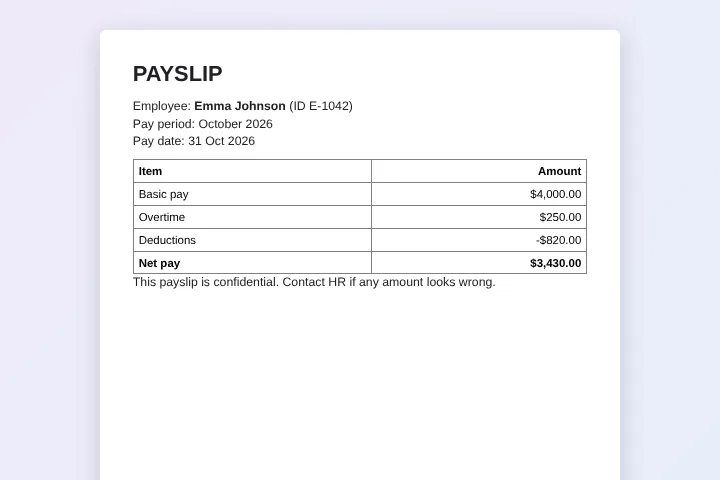
- Preview a payslip. Check how a payslip looks for any employee. The table, company name and notes come from a Google Doc you can edit.
- Create the payslips. Sign in with Google; your file becomes a Google Sheet in your Drive and each employee gets a PDF payslip named after them.
Payroll stays in your spreadsheet
Many small companies calculate pay in Excel or Google Sheets: hours, overtime, tax and deductions are formulas, and the result is a net amount per person. The missing step is a clean payslip for each employee. This generator takes the final numbers from each row and puts them into a payslip layout, without retyping.
MergeDoc does not calculate pay. It shows the values exactly as your sheet displays them, so your formulas and rounding stay in control.
Using an Excel payroll file
Upload the .xlsx file in MergeDoc. Google converts it into a Google Sheet in your own Drive, which is then used for the merge. Your original Excel file is not changed. Next month, upload the new file, or paste the new figures into the same Google Sheet.
Keep the column names in the first row stable, for example Employee, Basic Pay and Net Pay, so the same payslip template works every month.
Private by design
Payslips contain the most sensitive numbers a company has. The files are created in your Drive by your own browser, and the content of the payroll never reaches MergeDoc's servers. Share each PDF only with its employee, or keep them in a folder that only HR can open.
Month-end routine
A simple routine works for most teams: finish the payroll calculations, freeze the figures, then run MergeDoc with PDF output into a folder named for the month, such as Payslips October 2026. Check two payslips against the sheet, then share each file with its employee. Because the sheet keeps the link to every payslip, you can answer questions months later without searching through email attachments.
Sample data
These are the columns the payslip template uses. Each row becomes one document. Download the sample CSV to see the format, or replace it with your own list.
| Employee | Employee ID | Period | Pay Date | Basic Pay | Overtime | Deductions | Net Pay |
|---|---|---|---|---|---|---|---|
| Emma Johnson | E-1042 | October 2026 | 31 Oct 2026 | $4,000.00 | $250.00 | $820.00 | $3,430.00 |
| Liam Smith | E-1043 | October 2026 | 31 Oct 2026 | $5,200.00 | $0.00 | $1,140.00 | $4,060.00 |
| Olivia Brown | E-1044 | October 2026 | 31 Oct 2026 | $3,600.00 | $180.00 | $700.00 | $3,080.00 |
| Noah Davis | E-1045 | October 2026 | 31 Oct 2026 | $4,700.00 | $90.00 | $950.00 | $3,840.00 |
Who uses this template
Small businesses
Give every employee a professional payslip without buying a full payroll system.
Accountants
Produce payslips for several small clients from the payroll sheets you already maintain.
Restaurants and shops
Turn weekly hours and tips into payslips for each staff member.
Non-profits
Issue monthly pay statements to staff and stipend statements to volunteers.
Frequently asked questions
Is the payslip generator free?
Yes. Up to 50 payslips a month are free, with no watermark. Pro has no MergeDoc limit for $5 a month or $39 a year.
Does it work with Excel?
Yes. Upload the .xlsx file and Google converts it to a Google Sheet in your Drive. The original Excel file stays as it is.
Does MergeDoc calculate tax?
No. Do the calculations in your spreadsheet; MergeDoc only places the results into each payslip.
Can employees see each other's payslips?
Not unless you share the whole folder with them. Each payslip is a separate PDF, so you can share or send each one individually.
Is payroll data sent to MergeDoc?
No. Payslips are created in your browser and saved in your Google Drive. MergeDoc stores only your account email, plan and file counts.
Related templates
Bulk Invoice Generator from Spreadsheet
Numbered PDF invoices with client, item, quantity and total.
Bulk Offer Letter Generator
Job offer letters with position, salary, start date and manager.
Generate PDFs from CSV in Bulk
Upload a CSV and get one PDF for every line.
Ready to try it?
Preview the template with sample data, then sign in with Google to create your files.
Use this template