Home › Templates › Bulk Offer Letter Generator
Bulk Offer Letter Generator
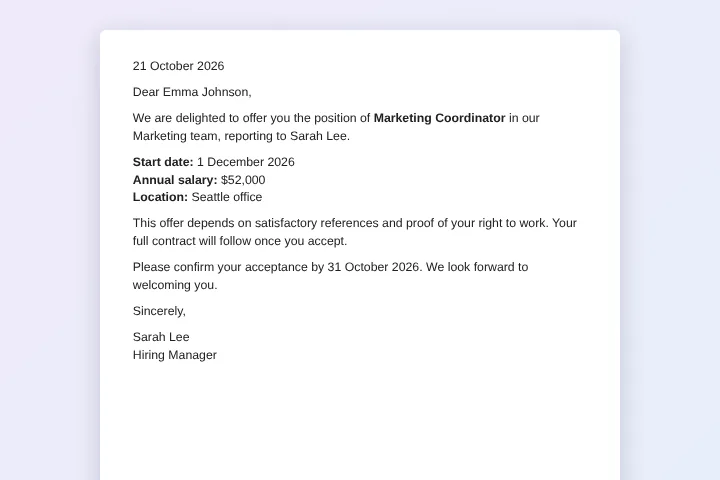
Prepare personalised job offer letters for every new hire at once, with position, salary, start date and reply deadline taken from your hiring sheet.
Use this templateFree · no sign-up to preview · 50 files a month · no watermark
How it works
- Fill the hiring sheet. Use the sample candidates or upload your tracker as CSV or Excel: one row per candidate with role, salary, start date and manager.
- Review an offer. Preview the letter for any candidate. Your company wording, logo and benefits text come from a Google Doc HR can edit.
- Create every letter. Sign in with Google and create the offers as Google Docs for review or PDFs ready to send, all in one Drive folder.
Built for hiring rounds
Graduate intakes, seasonal staff and new store openings all mean many offers at once. Writing each letter by hand takes hours and invites mistakes in the most sensitive details: salary, title and start date. A bulk offer letter generator takes those details from the row that HR has already checked.
Keep one approved letter per type of contract, for example full-time, part-time and internship, and choose the right template for each run.
Editable drafts first, PDFs when final
Choose Google Doc output to create drafts that a manager can read and comment on before anything is sent. When everything is approved, run again with PDF output, or choose both from the start.
Name files with the candidate and role, such as {{Candidate}} - {{Position}} offer, so the right letter is easy to find when the candidate calls with a question.
Sensitive data stays in your account
Salaries and personal details should not be uploaded to yet another service. With MergeDoc the letters are created by your browser, inside your own Google Drive, and only the people you share the folder with can open them.
Details worth adding to the sheet
Besides salary and start date, many teams add columns for working hours, probation period, benefits package and the reporting address on day one. Each new column can appear in the letter as a tag. Keep the reply deadline as a real date in the sheet so it is easy to sort candidates by who still needs to answer, and use the status column MergeDoc adds to see which letters were created.
Sample data
These are the columns the job offer letter template uses. Each row becomes one document. Download the sample CSV to see the format, or replace it with your own list.
| Candidate | Position | Department | Manager | Start Date | Salary | Location | Respond By | Offer Date |
|---|---|---|---|---|---|---|---|---|
| Emma Johnson | Marketing Coordinator | Marketing | Sarah Lee | 1 December 2026 | $52,000 | Seattle office | 31 October 2026 | 21 October 2026 |
| Liam Smith | Junior Developer | Engineering | David Kim | 1 December 2026 | $68,000 | Remote | 31 October 2026 | 21 October 2026 |
| Olivia Brown | Customer Support Specialist | Support | Maria Garcia | 15 November 2026 | $45,000 | Austin office | 31 October 2026 | 21 October 2026 |
| Noah Davis | Data Analyst | Finance | James Wilson | 1 December 2026 | $61,000 | Hybrid (Denver) | 31 October 2026 | 21 October 2026 |
Who uses this template
Graduate programmes
Send dozens of offers on the same day, each with the right team, manager and salary.
Retail and hospitality
Hire seasonal staff for many locations with their own start dates and hourly rates.
Recruitment agencies
Prepare offer letters for clients' candidates from the placement sheet.
Internships
Issue internship offers with stipend, mentor and dates for each intern.
Frequently asked questions
Is the offer letter generator free?
Yes, up to 50 letters a month with no watermark. Pro has no MergeDoc limit for $5 a month or $39 a year.
Can I edit a letter after it is created?
Yes, if you choose Google Doc output. Each letter is a normal Google Doc in your Drive that you can change before sending.
Can I upload my applicant tracker from Excel?
Yes. Upload the .xlsx or a CSV export; Google turns it into a Google Sheet in your Drive and the letters are made from it.
Does MergeDoc email the offers?
No. It creates the letters and saves them in your Drive. Send them from your own email so replies come straight to you.
Who can see salary details?
Only people with access to your sheet and folder. MergeDoc never copies the content of your rows or letters to its servers.
Related templates
Generate Contracts from a Spreadsheet
Service agreements with client, service, term, fee and payment terms.
Payslip Generator from Excel or Google Sheets
Monthly payslips with basic pay, overtime, deductions and net pay.
Mail Merge Google Docs from Google Sheets
Personalised customer letters from a list of names and offers.
Ready to try it?
Preview the template with sample data, then sign in with Google to create your files.
Use this template