Home › Templates › Bulk Invoice Generator from Spreadsheet
Bulk Invoice Generator from Spreadsheet
Keep your billing in a spreadsheet and turn each row into a numbered PDF invoice with the client, the work, the amount and the due date.
Use this templateFree · no sign-up to preview · 50 files a month · no watermark
How it works
- Prepare the billing sheet. Use the sample invoices or upload your own CSV or Excel export. One row is one invoice: number, client, item, quantity, price and total.
- Preview each invoice. Choose a row to see the finished invoice. The layout, logo and payment details come from a Google Doc that you control.
- Create the PDFs. Sign in with Google and create every invoice as a PDF in your Drive, each named after its invoice number and client.
Invoices straight from your numbers
Freelancers and small businesses often track work in a spreadsheet anyway: who the client is, what was done and how much it costs. A bulk invoice generator turns that sheet into invoices without retyping anything, so the amounts on the PDF are always the amounts in your records.
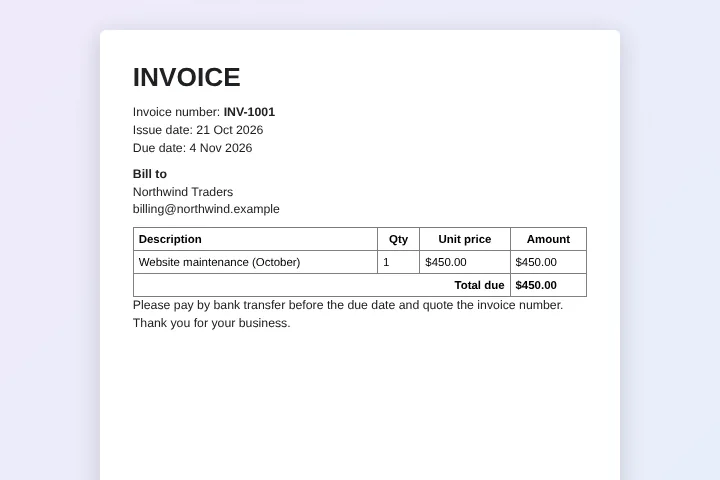
Calculate totals, tax or discounts with normal spreadsheet formulas. MergeDoc uses the value your sheet shows, including currency formatting, so $450.00 in the sheet is $450.00 on the invoice.
One row per invoice
This template has one line item per invoice, which suits monthly retainers, subscriptions and single jobs. If an invoice needs several lines, put them in one cell with line breaks, or add columns such as Item 2 and Amount 2 and the matching tags to the template.
Name each file with columns, for example {{Invoice Number}} - {{Client}}, so your invoice folder sorts by number and is easy to search at tax time.
Never invoice the same row twice
Each processed row gets a status and a link to its PDF. Next month, add new rows and run again: rows already marked as created are skipped. That makes the sheet a simple invoice register with a link to every document you issued.
Making the invoice yours
Replace the sample header with your business name, address, tax number and bank details directly in the Google Doc. Add payment instructions, late fee terms or a thank-you note at the bottom; that text is the same on every invoice. Dates appear exactly as formatted in the sheet, so choose the date format your clients expect, such as 4 Nov 2026 or 11/04/2026, before running.
Sample data
These are the columns the invoice template uses. Each row becomes one document. Download the sample CSV to see the format, or replace it with your own list.
| Invoice Number | Issue Date | Due Date | Client | Client Email | Item | Quantity | Unit Price | Total |
|---|---|---|---|---|---|---|---|---|
| INV-1001 | 21 Oct 2026 | 4 Nov 2026 | Northwind Traders | billing@northwind.example | Website maintenance (October) | 1 | $450.00 | $450.00 |
| INV-1002 | 21 Oct 2026 | 4 Nov 2026 | Blue Harbor Cafe | owner@blueharbor.example | Menu design | 2 | $120.00 | $240.00 |
| INV-1003 | 21 Oct 2026 | 4 Nov 2026 | Green Leaf Studio | accounts@greenleaf.example | Photo editing (hours) | 6 | $35.00 | $210.00 |
| INV-1004 | 21 Oct 2026 | 4 Nov 2026 | Summit Bikes | finance@summit.example | Social media management | 1 | $600.00 | $600.00 |
Who uses this template
Freelancers
Bill every client at the end of the month from one sheet of hours and rates.
Agencies with retainers
Issue the same monthly invoice to many clients with their own amount and due date.
Clubs and associations
Send membership fee invoices to every member from the member list.
Tutors and coaches
Invoice each student's family for the lessons recorded in the term sheet.
Frequently asked questions
Is the invoice generator free?
Yes. Create up to 50 invoices a month free, with no watermark and no credit card. Pro removes the limit for $5 a month or $39 a year.
Can I upload invoices from Excel?
Yes. Upload an .xlsx or CSV file; Google converts it to a Google Sheet in your Drive and the invoices are created from it.
Does MergeDoc calculate totals and tax?
No, your spreadsheet does. Use formulas in the sheet and MergeDoc copies the results into the invoice exactly as displayed.
Can it email invoices to clients?
No. MergeDoc creates the PDFs and saves them in your Drive with a link in each row. You send them with your usual email.
Are my clients' details kept private?
Yes. Invoices are made in your browser with your own Google account and saved in your Drive. MergeDoc's servers never receive the content.
Related templates
Payslip Generator from Excel or Google Sheets
Monthly payslips with basic pay, overtime, deductions and net pay.
Generate Contracts from a Spreadsheet
Service agreements with client, service, term, fee and payment terms.
Generate PDFs from CSV in Bulk
Upload a CSV and get one PDF for every line.
Ready to try it?
Preview the template with sample data, then sign in with Google to create your files.
Use this template