Home › Templates › Generate Contracts from a Spreadsheet
Generate Contracts from a Spreadsheet
Write your agreement once in Google Docs, list the clients and terms in a spreadsheet, and get a ready-to-sign contract for each row.
Use this templateFree · no sign-up to preview · 50 files a month · no watermark
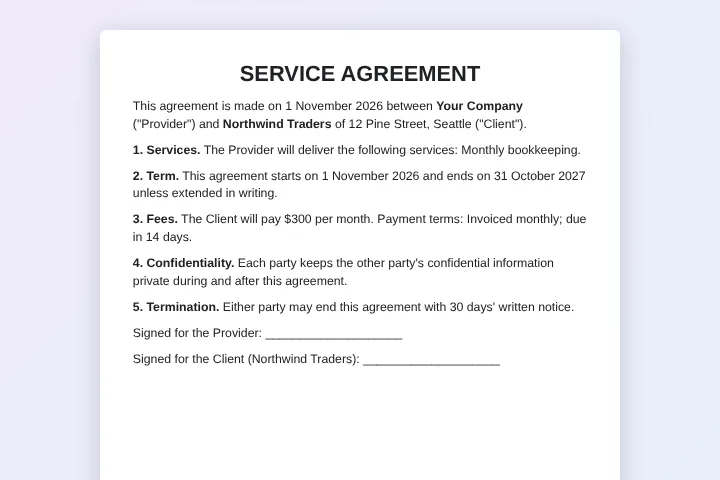
How it works
- List the deals. Use the sample clients or upload a CSV or Excel file where each row is one contract: client, address, service, dates, fee and payment terms.
- Check the wording. Preview the agreement for any row. The legal text stays exactly as written in your Google Doc; only the tagged details change.
- Create the contracts. Sign in with Google and create the contracts as editable Google Docs, PDFs, or both, saved together in your Drive.
Same terms, fewer copy-paste mistakes
Contracts are the worst place for copy-paste errors: an old client's name left in a clause, a wrong fee, a start date from last year. Generating contracts from a spreadsheet keeps the approved wording fixed and takes every variable detail from one row, so nothing is left over from the previous client.
Your lawyer or manager approves one template. After that, sales or operations only edit the spreadsheet, which is easier to review than dozens of separate documents.
Google Docs for edits, PDF for signing
Choose Google Doc output when a contract may still be negotiated: each client gets an editable copy you can change or share for comments. Choose PDF when the terms are final and the document is ready to sign or send. Both is fine too: you get the editable Doc and the PDF side by side.
Tags work anywhere in the document, including tables, headers and footers, so the client's name can appear in the page header of every page.
A register of every agreement
MergeDoc writes the status and a link to each contract back into its row. The spreadsheet becomes a register of what was issued, to whom and when. Add a column like Approved and set a condition so contracts are only created for approved rows.
Good practice for contract merges
Write dates and amounts in the sheet the way they should read in the contract, for example 1 November 2026 and $300 per month, rather than relying on raw numbers. Put long, client-specific clauses in their own column so the main template stays clean. Before sending, open two or three generated contracts and read them end to end; a merge copies exactly what is in the row, including typing mistakes.
Sample data
These are the columns the service agreement template uses. Each row becomes one document. Download the sample CSV to see the format, or replace it with your own list.
| Client Name | Client Address | Service | Start Date | End Date | Fee | Payment Terms |
|---|---|---|---|---|---|---|
| Northwind Traders | 12 Pine Street, Seattle | Monthly bookkeeping | 1 November 2026 | 31 October 2027 | $300 per month | Invoiced monthly; due in 14 days |
| Blue Harbor Cafe | 8 Dock Road, Portland | Social media management | 1 November 2026 | 30 April 2027 | $450 per month | Invoiced monthly; due in 14 days |
| Green Leaf Studio | 40 Oak Avenue, Austin | Website maintenance | 15 November 2026 | 14 November 2027 | $1200 per year | 50% upfront and 50% after 6 months |
| Summit Bikes | 3 Ridge Lane, Denver | IT support (10 hours per month) | 1 December 2026 | 30 November 2027 | $650 per month | Invoiced monthly; due in 30 days |
Who uses this template
Service businesses
Issue maintenance, cleaning or support agreements to every client with their own scope and fee.
HR teams
Prepare employment or contractor agreements from the hiring tracker, with roles, dates and pay.
Landlords
Create tenancy agreements for each unit with the tenant, rent, deposit and lease dates.
Event organisers
Send vendor and sponsor agreements with the package, price and payment schedule for each.
Frequently asked questions
Is it free to generate contracts?
Yes, up to 50 contracts a month with no watermark. Pro has no MergeDoc limit for $5 a month or $39 a year.
Is this template legal advice?
No. The sample agreement shows how the merge works. Have your own contract text reviewed by a lawyer before you use it.
Can clients sign inside MergeDoc?
No. MergeDoc creates the documents. Use the PDFs with the e-signature tool you already use, or print them.
Can I use Excel instead of Google Sheets?
Yes. Upload the Excel or CSV file and Google converts it into a Google Sheet in your Drive before the contracts are made.
Who can see the contracts?
Only you and the people you share them with. Files are created in your own Google Drive and the content never passes through MergeDoc's servers.
Related templates
Bulk Offer Letter Generator
Job offer letters with position, salary, start date and manager.
Bulk Invoice Generator from Spreadsheet
Numbered PDF invoices with client, item, quantity and total.
Mail Merge Google Docs from Google Sheets
Personalised customer letters from a list of names and offers.
Ready to try it?
Preview the template with sample data, then sign in with Google to create your files.
Use this template