Home › Templates › Bulk Name Badge Generator
Bulk Name Badge Generator
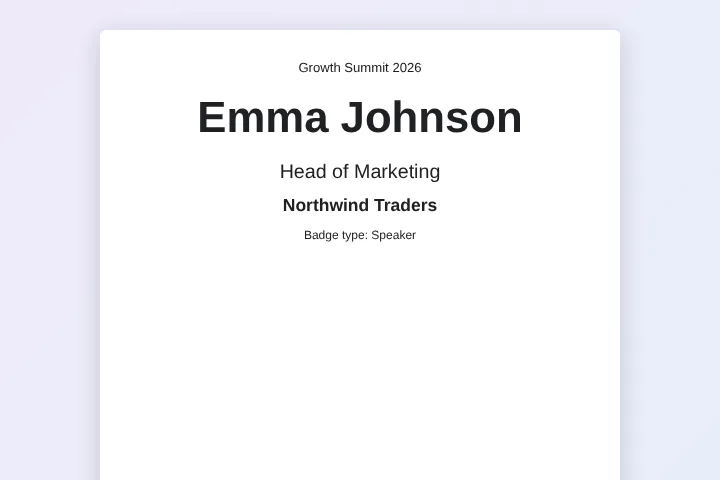
Turn your event registration list into printable name badges, with each attendee's name, role, company and badge type in large, easy-to-read text.
Use this templateFree · no sign-up to preview · 50 files a month · no watermark
How it works
- Load the attendee list. Upload the registration export as CSV or Excel, or try the sample attendees. Each row becomes one badge.
- Preview a badge. See the badge for any attendee. Change the size, fonts and logo in the Google Doc template to fit your badge holders.
- Create and print. Sign in with Google and create the badges as PDFs in one Drive folder, ready to print at the venue or a print shop.
From registrations to badges in minutes
Event teams usually get the final attendee list the day before the event. Typing names into a badge design at that point is stressful and mistakes are visible to everyone. A bulk name badge generator fills the badge design straight from the registration export, so late sign-ups only need a new row and a quick rerun.
Large names are easier to read across a room. The template uses a big bold name, then role and company, and a badge type line you can use for colours or access levels.
Sizing badges for printing
Each badge is its own page. Set the page size of the Google Doc to your badge holder, for example 4 x 3 inches, under File, Page setup, and every PDF uses that size. Most print shops and office printers can print a folder of PDFs in one go.
Use the Badge Type column for Speaker, Sponsor, Staff or Attendee, and a condition to create one type at a time if each type is printed on different coloured card.
Last-minute changes
Every created badge is marked in the sheet. When someone registers on the morning of the event, add the row and run again: only the new badge is made. If a name is misspelt, correct it, clear the row's status and rerun that one badge.
Design tips for readable badges
Use a plain, heavy font for the name and keep it at least twice the size of the other lines. First names only can be easier to read; add a First Name column and use that tag for the big line. Leave a margin of a few millimetres so the printer does not cut letters off, and print one test badge on the real card before printing the whole batch.
Sample data
These are the columns the event name badge template uses. Each row becomes one document. Download the sample CSV to see the format, or replace it with your own list.
| Name | Role | Company | Event | Badge Type |
|---|---|---|---|---|
| Emma Johnson | Head of Marketing | Northwind Traders | Growth Summit 2026 | Speaker |
| Liam Smith | Software Engineer | Blue Harbor Labs | Growth Summit 2026 | Attendee |
| Olivia Brown | Founder | Green Leaf Studio | Growth Summit 2026 | Sponsor |
| Noah Davis | Product Manager | Summit Bikes | Growth Summit 2026 | Attendee |
Who uses this template
Conferences
Print badges for hundreds of attendees, speakers and sponsors from the ticketing export.
Company events
Make badges for an internal kickoff or training day from the HR list.
Schools and camps
Create name tags for students, parents and staff on open days and trips.
Meetups
Turn an RSVP export into simple badges for community events.
Frequently asked questions
Is the badge generator free?
Yes, up to 50 badges a month with no watermark. Pro has no MergeDoc limit for $5 a month or $39 a year.
Can I put several badges on one page?
Each row becomes its own page or PDF. To print several per sheet, use your printer's pages-per-sheet option, or design a smaller page size.
Can I use my ticketing tool's export?
Yes. Upload the CSV or Excel export; Google converts it into a Google Sheet in your Drive and the badges are made from it.
Can I add a logo or QR code image?
You can add your logo to the template. A different image per attendee is not supported; text from any column can be placed anywhere.
Is attendee data private?
Yes. The badges are made in your browser and saved to your Google Drive. MergeDoc's servers never receive attendee details.
Related templates
Bulk Certificate Generator from Google Sheets
Course completion certificates with name, course, score and number.
Generate PDFs from CSV in Bulk
Upload a CSV and get one PDF for every line.
Google Sheets to PDF Mail Merge
One PDF per row from any Google Docs template.
Ready to try it?
Preview the template with sample data, then sign in with Google to create your files.
Use this template