Home › Templates › The Simple Autocrat Alternative
The Simple Autocrat Alternative
Autocrat is a well-known free document merge add-on for Google Sheets. MergeDoc does the core job, one document per row, in a simpler way. Here is an honest comparison so you can choose.
Use this templateFree · no sign-up to preview · 50 files a month · no watermark
How it works
- Bring your sheet. Open MergeDoc in any browser and choose your Google Sheet, or upload a CSV or Excel file. Nothing to install in Google Sheets.
- Reuse your template. Pick your Google Doc. Your existing <<Tags>> from Autocrat work as they are, and {{Tags}} work too.
- Run the merge. Choose Google Doc, PDF or both and run. Status, link and time are written next to each row; finished rows are skipped next time.
What Autocrat does well
Autocrat is published by New Visions Cloudlab and listed in the Google Workspace Marketplace. Its listing describes it as a document merge tool that creates PDF or shared documents from spreadsheet data, with fields marked as <<merge tags>>. It can run when new form responses arrive, can run on a time trigger, and can optionally send the documents as email attachments.
If you need automatic emailing of each document, Autocrat offers that and MergeDoc does not. If your merge is already set up in Autocrat and works well for you, there is no need to switch.
Where MergeDoc is different
MergeDoc focuses on fewer steps. You pick a sheet, a template, an output and a folder on one screen, and tags are matched to columns automatically by name. It runs as a web app in any browser, so you do not need to install an add-on in each spreadsheet, and you can try a template with sample data before signing in.
After each row it writes a plain-language status, the file link and the time. Rows already marked as done are skipped, so running the job again after adding rows is safe. MergeDoc only asks for access to the files you pick or that it creates, not your whole Drive.
Side by side
Both tools merge Google Sheets rows into Google Docs and PDFs and both read <<tags>>; MergeDoc also reads {{tags}}. Autocrat is free to use and can email attachments and run on form or time triggers. MergeDoc's web app is free for 50 files a month and $5 a month or $39 a year for Pro; it does not send email or run on a schedule. Choose the one that matches how you work.
Moving a job from Autocrat
Open MergeDoc, choose the same spreadsheet and the same Google Doc template you used in Autocrat. The <<tags>> are detected and matched to columns with the same names. Pick the output type and folder, then run on a copy of the sheet or a few test rows first. Autocrat's own status columns are left untouched; MergeDoc adds its own three columns at the end of the data.
Sample data
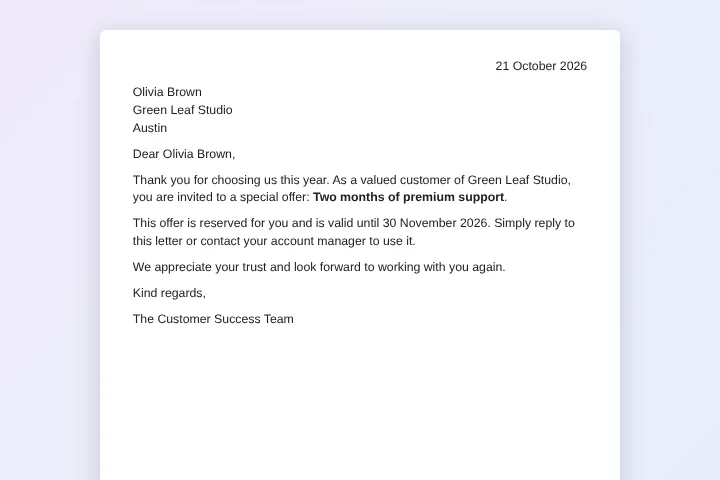
These are the columns the customer letter template uses. Each row becomes one document. Download the sample CSV to see the format, or replace it with your own list.
| Name | Company | City | Offer | Expiry | Date |
|---|---|---|---|---|---|
| Emma Johnson | Northwind Traders | Seattle | 15% off your next order | 30 November 2026 | 21 October 2026 |
| Liam Smith | Blue Harbor Cafe | Portland | A free onboarding session | 30 November 2026 | 21 October 2026 |
| Olivia Brown | Green Leaf Studio | Austin | Two months of premium support | 30 November 2026 | 21 October 2026 |
| Noah Davis | Summit Bikes | Denver | Free shipping for a year | 30 November 2026 | 21 October 2026 |
Who uses this template
Teachers moving from Autocrat
Reuse the same certificate or report template with its <<tags>> and run it from the browser.
Small offices
Make letters or invoices from a sheet without configuring triggers or email rules.
Occasional merges
Do a one-off merge from a CSV export without installing anything in Google Sheets.
Privacy-minded teams
Merge with access limited to the files you choose, while content stays in your Google account.
Frequently asked questions
Is MergeDoc free like Autocrat?
MergeDoc is free for 50 files a month with no watermark. Pro costs $5 a month or $39 a year and has no MergeDoc limit.
Will my Autocrat templates work?
Usually yes. MergeDoc reads <<Tag>> as well as {{Tag}}, so a Google Doc template made for Autocrat can be picked directly.
Can MergeDoc email the documents like Autocrat?
No. MergeDoc saves the documents in your Drive and writes their links into the sheet. Use Autocrat if automatic emailing is essential.
Can MergeDoc run automatically on form submit?
The MergeDoc web app runs when you click Run. It does not run on its own on a schedule or when a form is submitted.
Do I need to install anything?
No. MergeDoc's web app runs in Chrome, Edge, Safari, Firefox or Coc Coc. You sign in with Google when you are ready to create files.
Related templates
Mail Merge Google Docs from Google Sheets
Personalised customer letters from a list of names and offers.
Google Sheets to PDF Mail Merge
One PDF per row from any Google Docs template.
Bulk Certificate Generator from Google Sheets
Course completion certificates with name, course, score and number.
Ready to try it?
Preview the template with sample data, then sign in with Google to create your files.
Use this template